Solidly provides a native macOS workspace for inspecting, editing, and rebuilding materials across GLB, glTF, FBX, and OBJ assets. Parameter adjustments reflect immediately in the real-time viewport, and saving writes changes directly back into the source file without requiring re-export from 3D modelling tools.
Material configuration and surface assignment
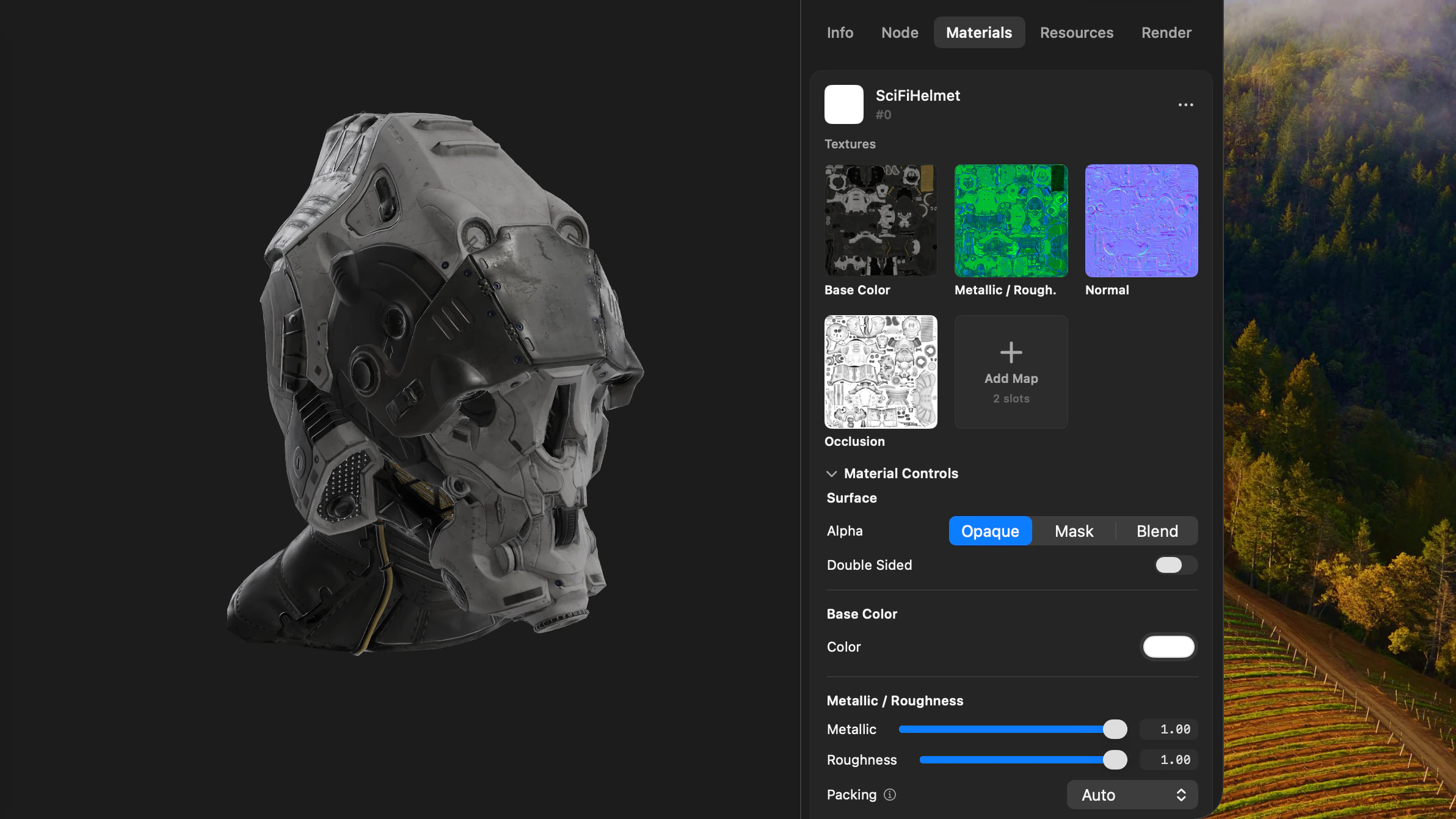
The Materials tab organises every material in the 3D model into an interactive card displaying surface factors, texture bindings, and alpha modes. Adjusting sliders updates the viewport in real time, and individual materials can be reverted to their disk state at any point.
Above the material list, the Textures pool catalogues every referenced image once, detailing its resolution, source path, and binding dependencies, with full-resolution previews available on click. New materials can be added to the model and assigned by dragging cards directly onto mesh surfaces in the viewport. Unused materials can be removed, and texture sampler settings such as wrap modes, filtering, and UV transforms can be adjusted directly.
Editing materialsDiagnostic visualizers and channel isolation
The Render tab provides real-time visualizers to evaluate material channels directly on the geometry. Visualizers display roughness and metallic values as greyscale passes, raw normal maps, shading normals, tangents, vertex colours, and UV coordinates via checker patterns.
Independent channel switches allow isolating or disabling base colour, normal maps, metallic, roughness, occlusion, emission, or alpha. Evaluating individual contributions in isolation makes it straightforward to verify texture maps and isolate shading artefacts under clean environment lighting.
VisualizersglTF material extensions and variants
Solidly supports the complete suite of Khronos glTF material extensions. Extensions such as clearcoat, surface sheen, transmission, volume, iridescence, and anisotropy can be added directly to any material card, with properties updating live in the viewport.
For models with KHR_materials_variants, the Variants section allows creating new variants, switching active configurations in the viewport, and assigning materials directly to the active variant.
FBX, OBJ, and material reconstruction
Solidly respects the native shading conventions of each format. FBX materials expose controls appropriate to their authored model: Phong shaders provide adjustments for specular colour and shininess, while physically based materials such as Autodesk Standard Surface and Stingray PBS expose metallic and roughness channels. OBJ materials support standard diffuse and specular parameters alongside modern PBR extensions for roughness, clearcoat, sheen, and transmission.
For FBX and OBJ assets with missing or disconnected textures, Solidly scans adjacent folders, evaluates filenames and pixel contents to identify texture channels, and groups matching images into candidate materials. Suggested textures can be applied across the model with Merge Suggested or mapped by dragging cards onto surfaces in the viewport, with physical controls automatically exposed when assigning metallic or roughness maps to legacy shaders.
FBX materialsMaterial editing by format
| Feature | glTF and GLB | FBX | OBJ | USD |
|---|---|---|---|---|
| Base colour, metallic, roughness, normal, and emission | Edited | Edited | Edited | Described |
| Occlusion | Edited | Not in the format | Not in the format | Described |
| Opacity, alpha mode, and double-sided | Alpha mode and double-sided | Opacity, and double-sided on the node | Opacity | Described |
| Shading-model properties | Material extensions | Phong specular and shininess | MTL PBR extensions | Shading network shown as a graph |
| Material variants | Edited | Not in the format | Not in the format | Variant sets selected |
| Texture samplers and transforms | Edited | No | No | Described |
| Material suggestions | No | Yes | Yes | No |
| Adding and assigning materials | Yes | Yes | Yes | No |
| Saved to the file | Yes | Yes | Yes | No |
Availability
Every feature on this page is included in Solidly's 30-day free trial with no payment details required. Solidly Standard is a one-time purchase that keeps full functionality permanently. See pricing.
Solidly requires an Apple silicon Mac running macOS 26 or later.
Limitations
- Solidly edits material properties defined by each format's schema; it does not author arbitrary node shader graphs or MaterialX networks.
- Solidly binds and rebinds texture maps but does not paint or edit bitmap image contents, beyond extracting opacity maps from base colour alpha channels.
- USD materials are inspected and visualised but not edited; STL and PLY formats do not contain material objects.
- 3MF material values can be adjusted to preview their effect but are not saved; STEP and IGES files have no Materials tab.
- The standard FBX format lacks an ambient occlusion property; occlusion maps assigned from suggestions render in the viewport and copy beside the file, but are not referenced in the saved FBX schema.
- Diagnostic channel packing and normal map orientation overrides are session-only settings and are not written to file data.
- Solidly preserves the native file format on save and does not convert materials between different file formats.
Frequently asked questions
How can I edit the materials of a GLB file?
Open the GLB file in Solidly and navigate to the Materials tab. Expanding any material card reveals surface parameters, texture channel slots, and Khronos material extensions. Edits display live in the viewport and write directly back into the GLB container upon saving.
How do I fix missing textures on an FBX or OBJ model?
Store loose texture images in the directory containing the model and open the file in Solidly. Solidly automatically scans the folder, matches image channels to material slots, and generates suggested materials. Clicking Merge Suggested binds the textures and updates the source FBX or MTL file upon saving.
Can I add a texture to a 3D model in Solidly?
Solidly binds texture maps to existing material slots through the Materials tab or via material suggestions built from adjacent image files. Suggestions can also be assigned by dragging cards directly onto mesh surfaces in the viewport. Solidly does not project, paint, or unwrap new textures, though it can compute UV coordinates for untextured glTF and OBJ geometry.
Can Solidly edit USD materials?
Solidly inspects and visualises USD materials, including composed MaterialX networks and UsdPreviewSurface definitions, but does not edit them. Solidly is a read-only viewer for USD files.
Is Solidly's material editor free?
Solidly includes an unrestricted 30-day trial with no credit card required. Continued use after 30 days requires purchasing a permanent Solidly Standard license.